

Create a key
1
Confirm the context
Check the workspace profile and environment banner. Choose a name that identifies the service or integration using the key.
2
Choose access and expiration
Select Create API key. Enter the key name, choose an API access profile and set its expiration. The form defaults to 90 days and accepts 1 to 365 days.Profiles include Read product data, Origination integration and Monitoring integration. Billing reports is available to Owners. Choose the access your service actually needs.
3
Confirm your identity
Complete the requested password, recent provider sign-in or MFA check. These checks protect credential creation and other sensitive settings.
4
Save the credential securely
Copy the new secret when it is shown. Store it in your server’s secret manager. The full secret is shown once; the key list displays identifying metadata rather than a recoverable secret.
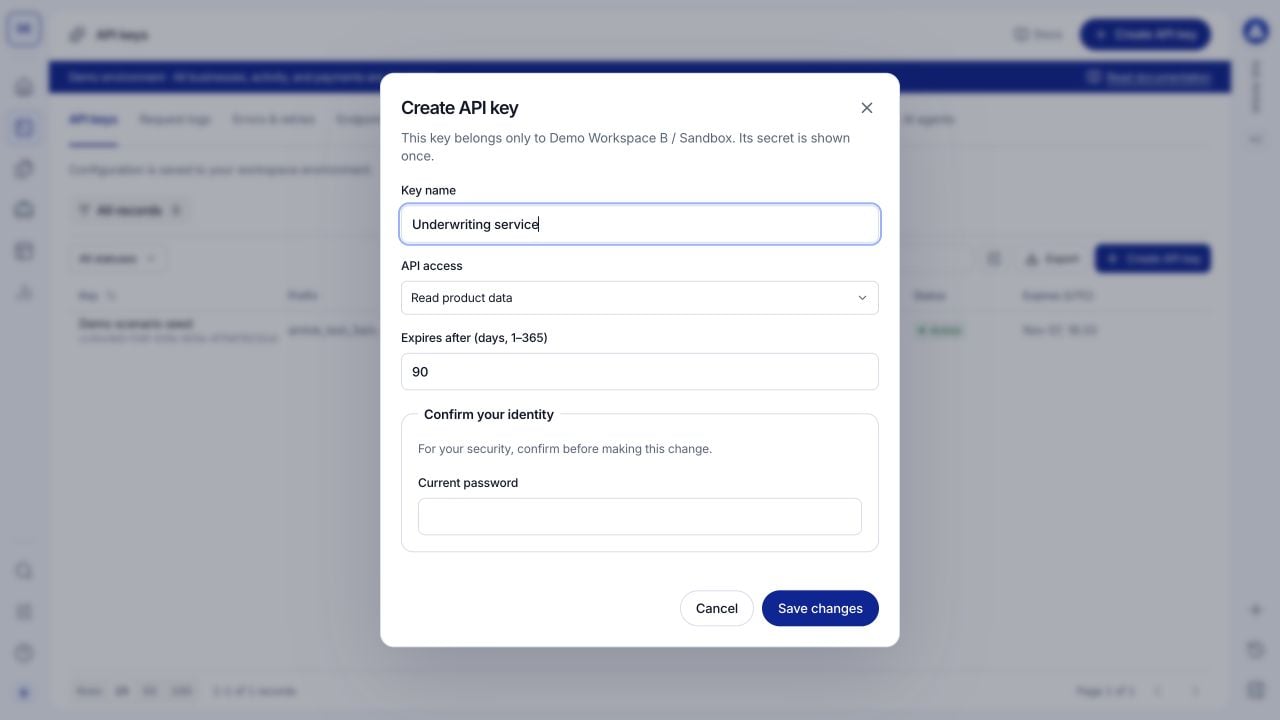
Create a key for a named service and choose its access profile. This screenshot contains no credential.
Inspect and replace a key
Open a key record to inspect its name, prefix, access and expiration. Match request activity to the key’s identifying metadata when investigating a service. To replace a credential, create a new key, update your server’s stored secret and verify a successful request. Then revoke the previous key. Revocation prevents further use; it does not erase historical requests.Use developer resources
Dev Tools > SDKs and integrations provides Node.js and cURL examples plus links to implementation guides. Copy an example into your server-side project and supply your own environment URL and securely stored key. Copying a template does not send a request. AI agents provides integration context you can give a coding assistant, including the API contract, credential handling and event-verification rules. Use it as implementation guidance; inspect actual records in the relevant console views.Troubleshoot authorization
- Authentication fails: confirm the secret, expiration and selected environment.
- A specific operation is forbidden: compare the operation’s required scope with the key’s access profile.
- Creation is unavailable: confirm your role, recent sign-in and any required authenticator setup.