Reporting separates operational activity from billing. Use the view that answers your question instead of treating request volume, processing counts and product consumption as interchangeable.

Choose the right report

Confirm the workspace, environment and reporting period. Filters on one view do not change the meaning or time window of a different report.

Review consumption

Open Consumption and inspect the product, subject, quantity, amount and period. Select a row to inspect its detail and related identifiers.
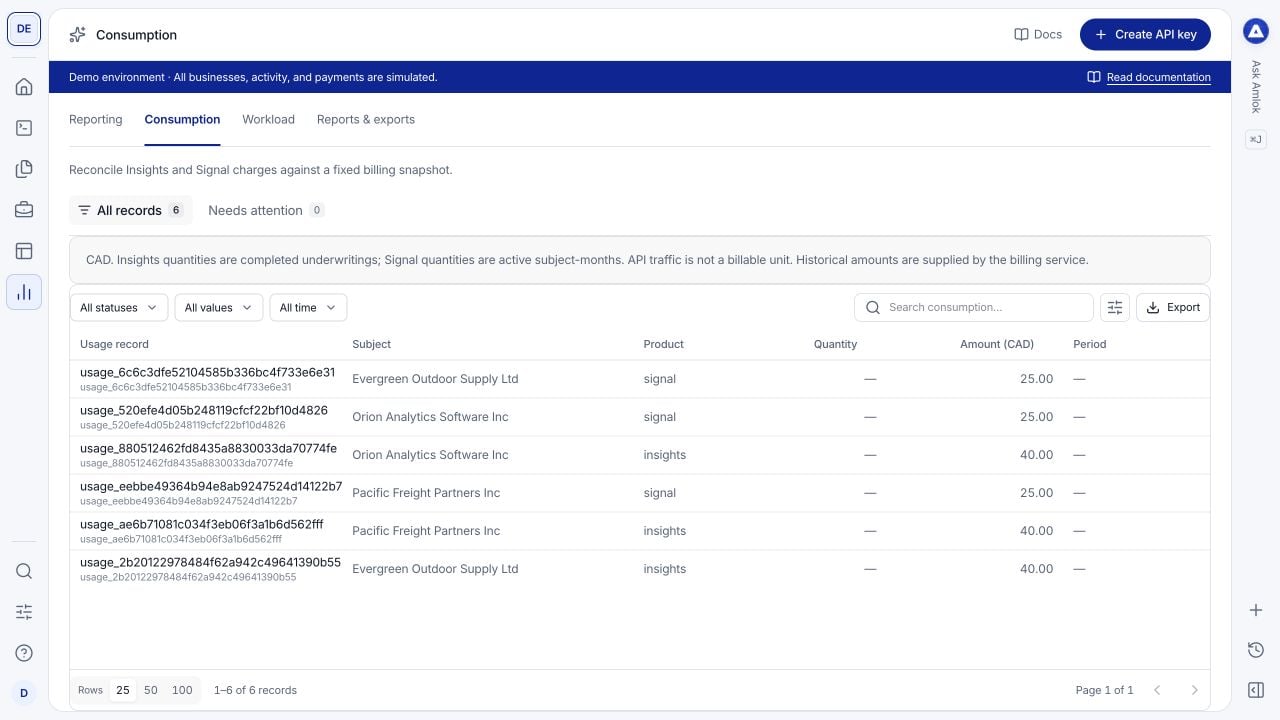
Consumption table showing usage records, subjects, products, quantities, CAD amounts and periods.

Consumption records describe product usage and charges. They are separate from raw API traffic.

Insights quantities represent completed underwritings. Signal quantities represent active subject-months under the billing contract. API calls and workload counts are not additional financial units. Use the recorded historical amount and billing context rather than recalculating an old charge from today’s price. To reconcile money, compare these records with Billing, Funding history and Statements. See the billing guide.

Investigate operational changes

If errors or response time increase, narrow the time range and endpoint, then open request logs for specific examples. If processing counts approach an agreed workload limit, review Workload and the applicable API capacity information. Check the denominator and period before comparing charts. A count of requests includes different operations from a count of completed underwritings; a processing failure may appear in operational activity without becoming a completed billable underwriting.

Export records

The table’s Export action downloads the filtered records currently available to that console collection. It is useful for a focused review, but is not a guarantee that you have exported every record in a large workspace. For complete programmatic retrieval, use the large-results workflow, pagination or the appropriate API export. In Reports & exports, open a record to inspect its status and available artifact information. An export that is still processing is not ready for download, and an expired download link must be refreshed through the documented flow. Respect the selected workspace, environment and your authorization when sharing exported data. Use enterprise operation and workload reporting for automated collection at volume.