

Create a hub
- Open Embeddings and select Create embedding.
- Choose Integrations Hub. Borrower Verification is shown as unavailable.
- Continue into the builder and give the configuration a recognizable name.
Choose integrations
The left panel organizes integrations by category. New configurations start with integrations disabled.- Use ALL, US or CA to filter the catalog by market. ALL is the default.
- Search for a provider or category, then expand the relevant category.
- Turn on each integration you want to offer.
- Use Select all to enable the integrations in the current filtered category. Clear all removes that selection.
- Use Selected to review what you have enabled.
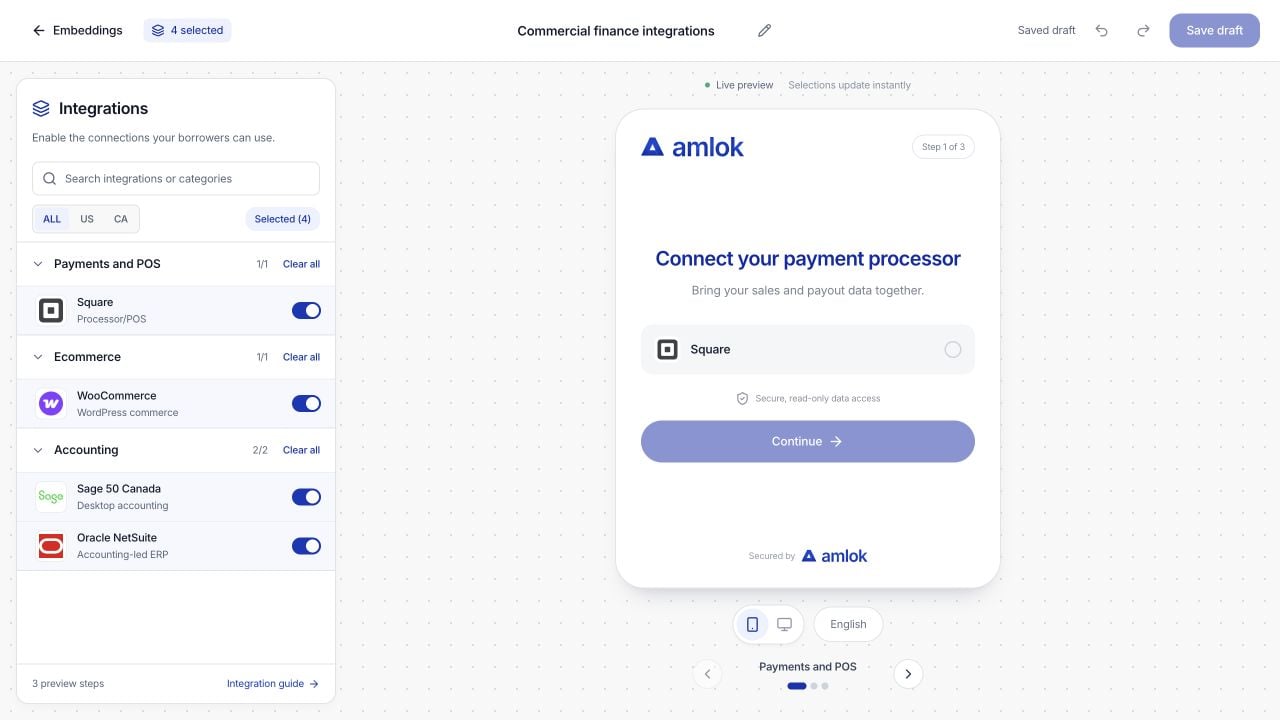
Select integrations on the left and inspect the borrower experience on the right. The preview contains only enabled choices.